See it in action
Brainstorm first.
Then structure.
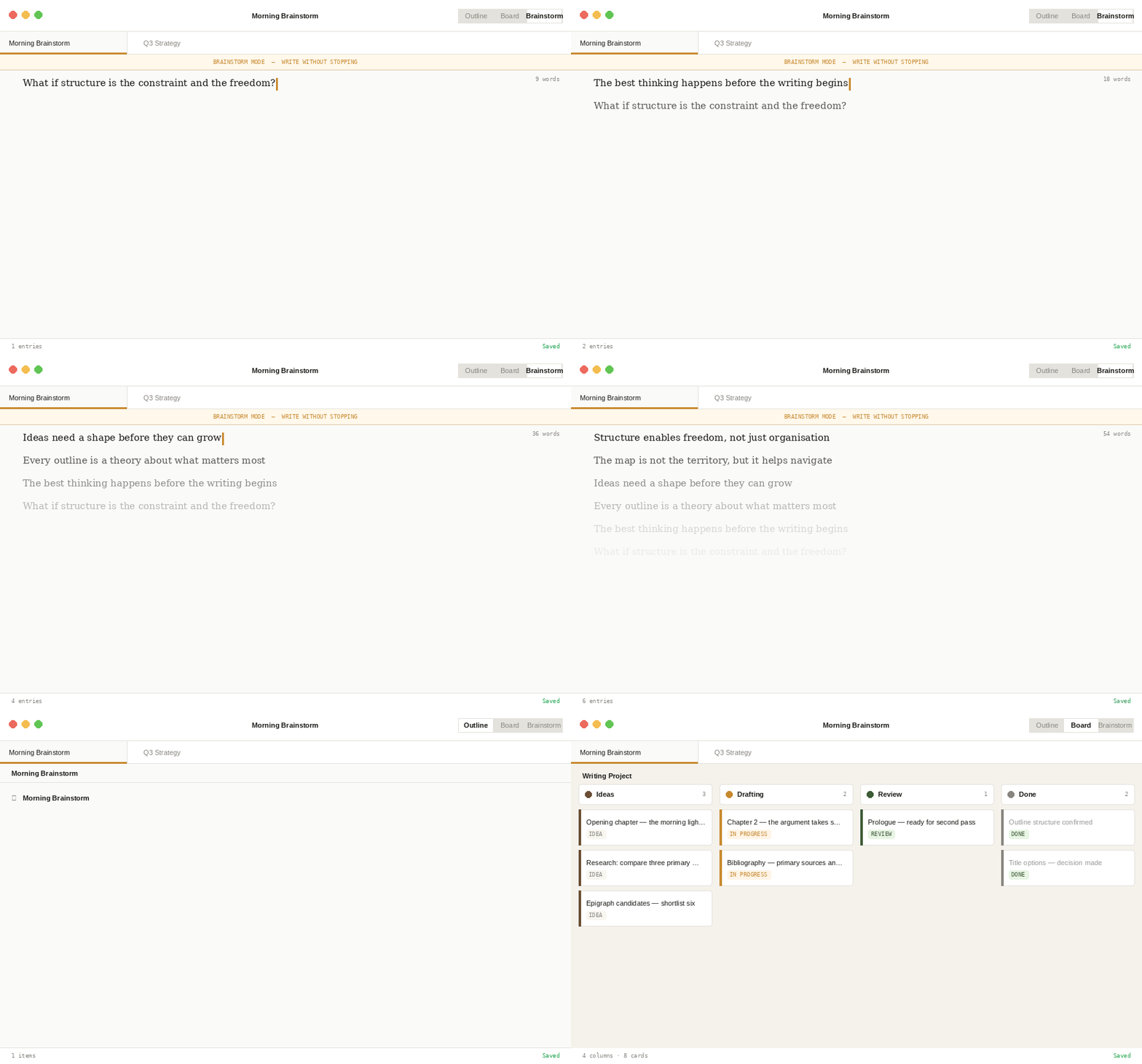
Write without stopping in Brainstorm mode. When you're ready, switch to Outline and your thinking is already organised.
Bough for Mac & Windows
A structured thinking workspace for writers, thinkers, and makers.
14-day free trial · One-time purchase · No subscription
New — Board View
Switch to Board View and your top-level nodes become columns, their children become draggable cards. Same data, different lens — reorganise by dragging, capture inline, and drill into any card without leaving the board.
Brainstorm first, sort after. After a Brainstorm session, a "Sort into groups" button drops all your items into an Unsorted column on the board. Drag them into shape, then promote the structure back to your outline — one continuous thinking flow.
See it in action
Write without stopping in Brainstorm mode. When you're ready, switch to Outline and your thinking is already organised.
Who it's for
14-day free trial · No account required · Works offline
In practice
Five situations where structured thinking makes the difference. Each one uses the same three-step flow.
Open Brainstorm mode and write without stopping. Arguments, counterarguments, half-formed ideas, things to check later. No organising. No deleting. Three minutes of honest thinking.
"The piece is about attention — but is it really about attention or the cost of losing it? What's the actual argument? Who am I writing this for?…"
Switch to Outline view. Your brainstorm items are there — now you can see the shape of the argument, identify what's missing, and move things into the right order. The structure reveals itself.
"Now I can see the real argument isn't about attention — it's about what we give it to, and why we're so bad at choosing."
Now open your writing app. You're not staring at a blank page — you're executing a plan you already understand. The hard thinking happened in Bough. The writing is just writing.
"First draft done in 90 minutes. Usually takes me a day."
Built for clarity
Not a scratchpad.
Not a writing app.
Not a task manager.
A place where raw thinking becomes clear thinking — before you do anything else with it.
Why Bough
No account required, no syncing spinner, no internet dependency. Open a file and you're writing in under a second.
Files are saved as OPML — a plain XML standard any outliner can read. Open your notes in five years with whatever software exists then.
No monthly fee. No Pro plan. Pay once and all minor updates are yours. Major version upgrades may be offered as a discounted paid upgrade — but we'll never lock you out of the version you bought.
Everything you need
Select any text and a contextual bar appears — bold, italic, underline, strikethrough, and links. No toolbar required.
One key opens a panel showing everything due today, across all open documents. Due dates travel with items into Board View cards and sort correctly.
Hit enter, keep typing, don't stop. Suppresses the urge to organise while generating. When you're ready, one tap sorts everything into Board View.
Keep several outlines open at once. Tabs are always visible. Drag to reorder. Each document autosaves independently.
Insert hyperlinks or local file links with ⌘K. Links display as clean readable labels — Cmd+click to open.
⌘⇧Space from anywhere drops a floating capture window. Append a thought to your outline without breaking your flow.
Per-document status definitions saved directly in the OPML file. Name, colour, and reorder — each file carries its own set.
40+ built-in templates across 7 categories — including Thinking templates for Problem Framing, Decisions, Arguments, and Learning.
Built for the long haul
Open a file in five years and it will still be there, in a format any app can read. We built Bough on OPML not because it's the easiest path, but because your work should outlast any particular piece of software — including ours.
Open formats
Bough saves natively to OPML and exports to six formats without leaving the app. Send a polished document to a client or a plain-text file to your own archive — the choice is always yours.
Questions
Nothing. Your files are standard OPML — an open XML format that any outliner, text editor, or even a web browser can open. You own your files outright and they live wherever you choose to save them. Bough could disappear tomorrow and your thinking would be completely intact.
Completely. Bough is a native desktop app with no server dependency. It opens files from your disk, saves to your disk, and never requires an internet connection to function. Activation requires a one-time online check, but after that it's entirely offline.
If your current app can export to OPML, Markdown, or plain text, you can get your data into Bough. OmniOutliner exports OPML natively. Notion requires a Markdown export and a quick conversion step. Most outliners speak some form of OPML.
Bough requires macOS 12 (Monterey) or later, and Windows 10 or later. Both Intel and Apple Silicon Macs are supported natively.
Download Bough and use it fully for 14 days — no account required, no credit card, no feature restrictions. After 14 days the app becomes read-only until you activate a license. Your files are always yours regardless.
Yes. A single license covers personal use across your own machines. Install it on your work Mac and home Mac, or your laptop and desktop PC.
Bough doesn't have its own sync — and that's intentional. If you want your files on multiple machines, place them in a folder that's already synced by iCloud Drive, Dropbox, or OneDrive. Any sync service works, and you're not locked into ours.
All minor updates are free. If we ever release a significant paid major version, it will be offered at a discounted upgrade price for existing customers — and the version you purchased will always keep working.
From the blog
Coming soon
Bough is nearly ready. Leave your email and we'll let you know the moment it's available — nothing else.
Founder pricing
Waitlist subscribers get notified first and will receive a discounted launch price — before it goes public.
macOS 12+ · Windows 10+ · One-time purchase · No subscription
From the maker
"I built Bough because I kept losing the gap between an idea and what I did with it."
Every tool I used was either a capture bucket or an execution engine. Nothing helped with the stage in between, the time between having an idea and knowing what to do with it. I wanted something local, fast, and honest about what it was. No cloud, no accounts, no features I'd never use. Just a place to think.
The name comes from the structure of a tree. One trunk, branching into sections, each section into its own children, organic and ordered at the same time. That's what an outline is. That's what thinking looks like when it's working.
— Greg, Structured Thinking